Stuttering and Blobs
Identifying stuttering
When printing with Marlinraker, it is possible that you may notice small blobs and zits on printed walls, especially on curved surfaces or corners. They might look something like this:
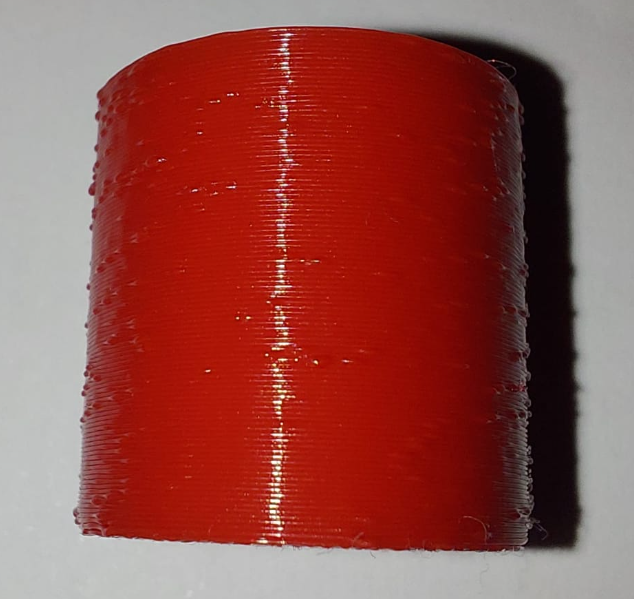
There are many reasons for these blobs to occur. One of these reasons is stuttering. Stuttering happens when the printer can't keep up with G-code sent to it and the toolhead has to pause before new commands come in. If you see your toolhead not moving smoothly in curved sections you very likely have this issue. Try printing a test object like a cylinder once with Marlinraker and once from a USB stick or SD card. If the blobs on your print were caused by stuttering it should have gone away when using an external storage device.
How to fix stuttering
Marlinraker settings
Firstly, make sure to always keep Marlinraker up to date for the latest bugfixes and performance improvements.
Some Marlinraker settings can negatively impact print performance and thus cause stuttering. Check these settings in your configuration to make sure you get the best performance:
extended_logs logs every line of G-code sent to the printer in
a text file. This negatively impacts print performance. Disable this
option if it is enabled.
report_velocity sends M114 G-codes in very short time intervals
to compute toolhead velocity and extruder velocity. Some firmwares
pause after receiving a M114 command which causes stuttering, so try
disabling this option too.
Also, try choosing as high of a baud rate as possible. The higher the
baud rate, the more throughput the serial port has. Ideally, set
baud_rate to "auto".
Arc Welder
Most modern slicers create curved perimeters by dividing them into a bunch of smaller straight line moves. This results in a lot of unnecessary commands having to be sent to the printer by the host. Arc Welder aims to mitigate this issue by replacing these straight line segments with arcs. This does not only significantly reduce file sizes, but also allows for a much lower serial throughput. If your printer supports G2/G3 G-codes, try using this software. You can use it with Marlinraker by adding it as a post-processing script.
Marlin configuration
If you have access to Marlin's Configuration.h and Configuration_adv.h
files, you could try changing following settings:
Configuration.h
Set the baud rate as high as possible to increase serial throughput.
Configuration_adv.h
Increase the block buffer size so that more moves can be stored in the planner.
Enable M154 G-code so that no M114 commands have to be sent to the printer.
Marlinraker host
While printing, check the CPU usage of your host machine. This usually shouldn't be a problem, but a low power SBC like an RPI zero can have problems keeping up when there are other processes running, like a system update for example.